
Seven Signs Your Software System Is Poorly Documented
Poor documentation rarely appears as a simple missing README. It shows up through slow onboarding, risky releases, repeated questions, and incidents that only one person knows how to resolve.
These seven signs can help engineering leaders identify documentation debt and decide what to fix first.
1. Only One Person Can Explain Critical Workflows
A healthy engineering team should be able to explain how important user and operational workflows move through the system.
When only one developer understands how an order becomes a payment, how a file reaches long-term storage, or how an account is provisioned, the system depends on tribal knowledge. Tribal knowledge is operational information stored mainly in people’s memory rather than in an accessible source.
The missing document is usually not a longer README. It is often a workflow diagram showing the entry point, services, data stores, asynchronous steps, failure states, and external dependencies.
2. Architecture Diagrams Cannot Be Trusted
An outdated diagram can be worse than no diagram because it creates false confidence.
Warning signs include diagrams containing services that no longer exist, missing queues or integrations, incorrect network boundaries, and no indication of which environment is represented.
A useful architecture diagram should have a clear scope, an owner, and a visible last-reviewed date. It should show meaningful relationships rather than every cloud resource.
3. Engineers Repeatedly Ask the Same Questions
Questions are normal. Repeated questions about the same basic topics indicate that knowledge is not being captured where engineers work.
Typical examples include:
- Which repository owns this service?
- How do I run it locally?
- Which environment variable controls this behavior?
- Who owns the deployment pipeline?
- What happens when this queue fails?
Search Slack, incident notes, pull requests, and support channels for recurring questions. They provide direct evidence of where documentation would reduce friction.
4. Releases Depend on Undocumented Manual Steps
A deployment process is poorly documented when success depends on remembering commands, changing configuration in a specific order, or contacting the person who normally handles releases.
The risk is higher when manual steps affect database migrations, secrets, DNS, feature flags, or rollback procedures.
Document the release sequence, prerequisites, validation checks, rollback path, and ownership. Better still, automate repeatable steps through a deployment pipeline. Documentation should explain the process and its exceptions; it should not replace automation.
5. Incidents Require Architecture Reconstruction
During an incident, the team should not need to rediscover the system before investigating the failure.
When responders first have to determine which service calls which database, where logs are stored, or who owns an external integration, the system lacks operational documentation.
Critical workloads need a runbook. A runbook is a practical procedure for diagnosing and handling an operational problem. It should include dashboards, log locations, likely failure modes, safe mitigation steps, escalation contacts, and recovery checks.
6. Changes Produce Unexpected Side Effects
Unexpected side effects often reveal undocumented dependencies.
A team changes a customer status field and breaks billing. A queue message gains a new property and causes an older consumer to fail. A shared database table is modified without realizing that another service reads it directly.
These are architecture and contract documentation gaps. The team may need a dependency map, API or event contracts, and clear ownership of shared data. Automated tests remain essential, but tests alone do not explain why a dependency exists or who may change it.
7. Onboarding Requires Constant Live Guidance
New engineers should not need to interrupt several people just to build, run, and understand the system.
A practical onboarding path should explain the repository structure, local setup, deployment model, major architectural decisions, important workflows, and safe starter tasks.
Live guidance remains useful. The problem is using meetings to communicate the same setup and architecture information every time someone joins.
A Practical Documentation Health Check
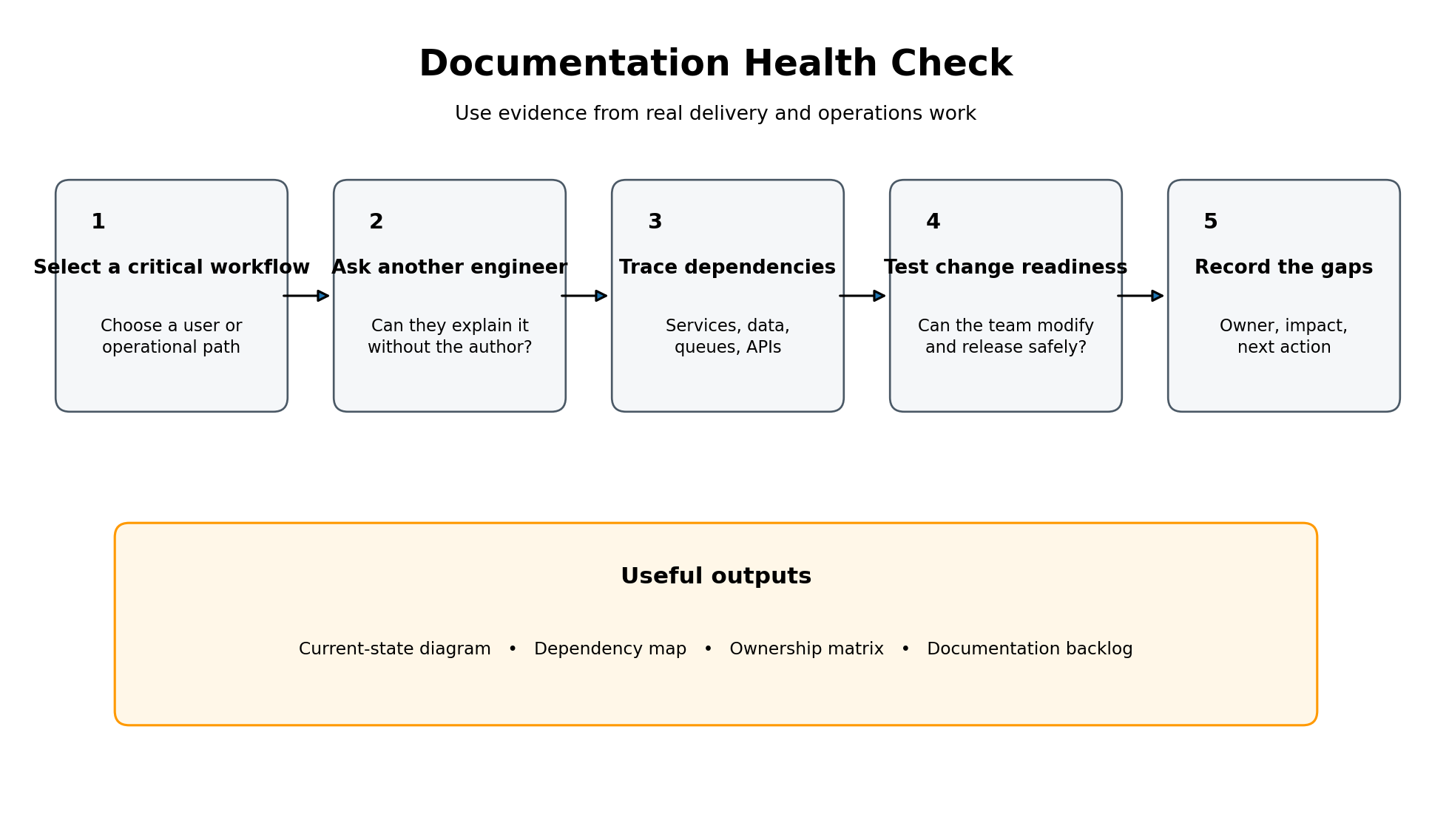
Do not begin by trying to document the entire platform. Start with one critical workflow:
- Select an important user or operational process.
- Ask an engineer who did not build it to explain the path.
- Trace the repositories, services, data stores, queues, and external systems involved.
- Verify whether the team can change, deploy, monitor, and recover the workflow safely.
- Record each knowledge gap with an owner, impact, and next action.
The output may include a current-state diagram, dependency map, runbook, API inventory, ownership matrix, or deployment guide. Prioritize artifacts that reduce delivery or operational risk.
Example: An Undocumented File-Processing Workflow
Consider a system where users upload compliance documents to Amazon S3. An S3 event invokes AWS Lambda, which extracts metadata, writes status to DynamoDB, and sends a message to Amazon SQS for antivirus scanning.
Failed scans eventually reach a dead-letter queue, but only the original developer knows this. A dead-letter queue stores messages that could not be processed after repeated attempts.
When that developer is unavailable, the team sees documents stuck in “processing” but does not know where to investigate. A workflow diagram, an alert for the dead-letter queue, and a recovery runbook would address the gap more effectively than a large general architecture document.
Trade-Offs and Common Mistakes
The main trade-off is maintenance cost. Every document creates another artifact that can become stale.
Avoid manually documenting details that are already clear in code or can be generated automatically. Focus documentation on context: why a decision was made, how components interact, what can fail, who owns the system, and how to operate it safely.
Another common mistake is measuring documentation by page count. Ten accurate pages tied to critical workflows are more useful than a large wiki that nobody trusts.
Conclusion
Poor documentation is visible in how the team works: repeated questions, fragile releases, unclear dependencies, slow incident response, and reliance on specific people.
Start with one critical workflow. Confirm that another engineer can understand, change, deploy, and recover it using the available documentation, then turn the gaps into a prioritized backlog.