
Reconstructing a Serverless SaaS Architecture
A serverless SaaS application can be difficult to understand when its documentation is incomplete, outdated, or spread across repositories and AWS accounts. Architecture reconstruction turns the available technical evidence into a reliable model of how the application actually works.
The objective is not to produce a decorative diagram. It is to create an operational map that engineers can use to assess risk, plan changes, investigate failures, and transfer knowledge.
What architecture reconstruction means
Architecture reconstruction is the process of discovering a system from its implementation and runtime behavior.
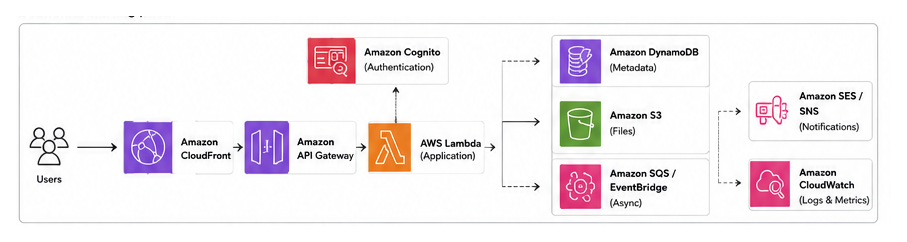
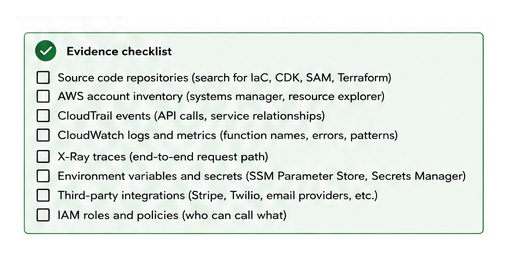
For an AWS serverless application, the evidence usually includes:
- Infrastructure as code such as AWS CDK, CloudFormation, SAM, or Terraform.
- Lambda source code and deployment configuration.
- API Gateway routes and integrations.
- EventBridge rules, SQS queues, SNS topics, and scheduled jobs.
- DynamoDB tables, S3 buckets, and relational databases.
- IAM roles, policies, secrets, and environment variables.
- CloudWatch logs, metrics, traces, and alarms.
- External integrations such as Stripe, Twilio, or email providers.
The result should explain both structure and behavior. Structure identifies the components. Behavior explains how requests, events, data, and failures move through them.
A practical reconstruction workflow
Do not begin by drawing every AWS resource. Start with one business capability and trace it from entry point to final outcome.

1. Establish the system boundary
Define what belongs to the application and what is external.
Record the user-facing clients, public APIs, administrative interfaces, AWS accounts, environments, third-party services, and major data stores. This prevents the reconstruction from expanding into unrelated infrastructure.
2. Build a resource inventory
Export or inspect the deployed resources and compare them with the infrastructure code.
Group resources by responsibility rather than by AWS service. For example:
- Authentication and tenant access.
- Booking or transaction processing.
- Notifications.
- Reporting.
- File storage.
- Background processing.
- Operational monitoring.
This grouping is more useful than a long list of Lambda functions and queues.
3. Trace critical workflows
Select three to five workflows that matter to the business. For each workflow, record:
- Entry point.
- Authentication and authorization checks.
- Synchronous calls.
- Events or queued messages.
- Data reads and writes.
- External integrations.
- Expected failure behavior.
- Logs and metrics available for diagnosis.
A sequence diagram is often more valuable here than another infrastructure diagram.
4. Validate assumptions with runtime evidence
Code reveals intended behavior. Logs and traces reveal actual behavior.
Use CloudWatch Logs, AWS X-Ray, CloudTrail, API Gateway access logs, and queue metrics to verify the paths you have documented. When evidence is unavailable, label the relationship as an assumption instead of presenting it as fact.
5. Produce a small set of maintainable documents
A useful initial package normally includes:
- System context diagram.
- Container or service-level diagram.
- Critical workflow diagrams.
- API and event inventory.
- Data-store ownership map.
- Authentication and authorization flow.
- Deployment architecture.
- Risks, unknowns, and follow-up questions.
Keep source files for diagrams in the repository. Generated images alone are difficult to maintain.
Example: reconstructing an appointment-booking flow
Assume a SaaS platform allows customers to book appointments with small businesses.
The public web application calls an API Gateway endpoint. The endpoint invokes a Lambda function that validates the tenant, reads service availability from DynamoDB, and creates an appointment. The function then publishes an event to EventBridge.
One subscriber sends a confirmation through an external messaging provider. Another updates reporting data. A scheduled Lambda later sends reminders.
The initial diagram may suggest a simple request-response flow. Runtime investigation may reveal that notification failures are retried through SQS and that the reporting subscriber is allowed to fail without affecting the booking.
That distinction matters. It identifies which operations are part of the critical transaction and which are eventually consistent. Eventual consistency means that dependent data may be updated after the original request completes rather than within the same transaction.
Trade-offs and common mistakes
Documenting resources instead of responsibilities
A diagram containing every Lambda function, IAM role, log group, and queue quickly becomes unreadable. Use multiple views: a simple system overview, focused workflow diagrams, and a detailed resource inventory.
Treating infrastructure code as complete truth
Infrastructure code may not include manually created resources, external configuration, runtime feature flags, or resources deployed by another pipeline. Compare declared infrastructure with the deployed environment.
Drawing unverified arrows
An arrow implies a real dependency. Verify it through code, configuration, logs, traces, or AWS service metadata. Mark uncertain paths explicitly.
Ignoring asynchronous behavior
Serverless systems often rely on queues, events, retries, dead-letter queues, and scheduled tasks. Omitting them hides failure modes and makes the architecture appear more synchronous than it is.
Pursuing perfect completeness
Reconstruction has diminishing returns. A critical-workflow map that supports an upcoming change is more valuable than a complete catalog that arrives too late. Prioritize the areas with the highest operational or delivery risk.
Conclusion
A reconstructed architecture should explain how the SaaS application delivers its most important capabilities, where data moves, and how failures are handled. Start with deployed evidence, validate the critical workflows, and record unknowns instead of guessing.
Choose one production workflow this week and trace it from user action to final side effect. That single exercise usually reveals the next diagrams, inventories, and operational questions worth documenting.