
Multi-Tenant Authentication with Amazon Cognito
Authentication is only part of the problem in a multi-tenant SaaS application. After identifying the user, every API request must also be tied to the correct tenant and authorized for the actions that user can perform.
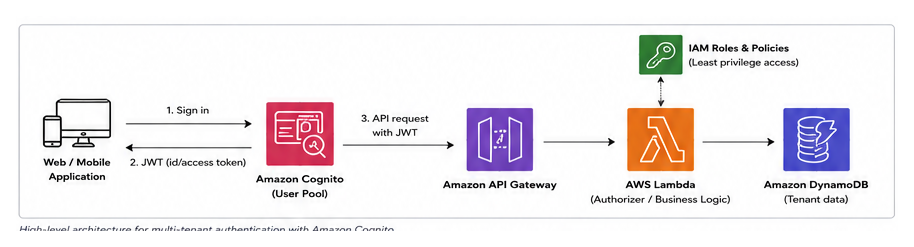
Amazon Cognito can handle sign-in and token issuance, but tenant isolation still has to be designed explicitly. The pattern below keeps authentication in Cognito while enforcing tenant boundaries in the application and data layers.
What Cognito should do
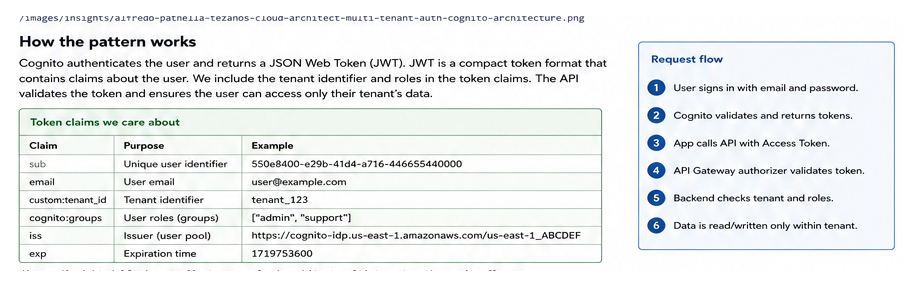
A Cognito User Pool manages users and authenticates them. After a successful sign-in, Cognito issues JSON Web Tokens (JWTs), which are signed tokens containing claims about the authenticated identity.
For a multi-tenant application, the important question is: which tenant does this identity belong to?
A practical model is to maintain a tenant identifier such as:
tenant_123The user record can store that identifier as a Cognito custom attribute such as custom:tenant_id. If the API needs the tenant identifier in the access token, use a supported Cognito token-customization mechanism such as a Pre Token Generation Lambda trigger [SOURCE NEEDED].
The API should derive tenant context from the validated token, not from a tenant ID submitted by the browser.
Separate authentication from authorization
Cognito answers:
Who is this user?
Your application must still answer:
What is this user allowed to do inside this tenant?
Do not treat possession of a valid Cognito token as permission to access every tenant resource.
A useful authorization context might contain:
{
  "sub": "550e8400-e29b-41d4-a716-446655440000",
  "tenant_id": "tenant_123",
  "roles": ["admin"]
}
sub is the Cognito user identifier. tenant_id establishes the tenant boundary. roles represents application permissions.
Cognito groups can be useful for coarse roles, but creating groups for every tenant-role combination becomes difficult to manage as tenant count grows. For larger systems, tenant membership and roles can instead be maintained in application data and projected into authorization claims when needed.
A practical implementation pattern
1. Authenticate with one Cognito User Pool
For many SaaS applications, one User Pool can serve multiple tenants. Each user is associated with a tenant identifier.
Separate User Pools can provide stronger administrative separation, but they also add operational overhead.
2. Put tenant context in the authenticated identity
Store or derive a tenant identifier for each user.
Do not rely on this request:
GET /bookings?tenantId=tenant_456to decide which tenant the caller can access.
Instead, extract the tenant identifier from the validated JWT.
3. Validate the token at the API boundary
API Gateway can validate Cognito-issued JWTs before invoking application logic. The backend then uses the validated claims supplied by the authorizer.
4. Enforce tenant isolation in every data operation
Suppose DynamoDB stores appointments.
A useful key design is:
PK = TENANT#tenant_123
SK = APPOINTMENT#abc123
The backend constructs the partition key from the authenticated tenant claim.
A simplified Lambda handler might contain:
const claims = event.requestContext.authorizer.jwt.claims;
const tenantId = claims["tenant_id"];

if (!tenantId) {
  throw new Error("Missing tenant context");
}

const pk = `TENANT#${tenantId}`;
The client never decides the partition key.
5. Apply role checks separately
Tenant membership answers where the user can operate. Roles answer what the user can do.
For example:
membercan view appointments.managercan modify schedules.admincan manage staff.
Keep these checks explicit in business logic or a shared authorization layer.
Example: appointment-booking SaaS
Consider a platform used by independent businesses.
Maria works for tenant_123. She signs in through Cognito and receives a token containing her identity, tenant context, and role.
She requests:
GET /appointmentsAPI Gateway validates the token. The Lambda function reads tenant_123 from the authenticated claims and queries only the DynamoDB partition for that tenant.
If Maria changes the browser request and sends tenant_456, the backend ignores it. If the API exposes a route such as /tenants/{tenantId}/appointments, the backend compares the path tenant with the authenticated tenant before accessing data.
That check is the actual tenant boundary.
Trade-offs and common mistakes
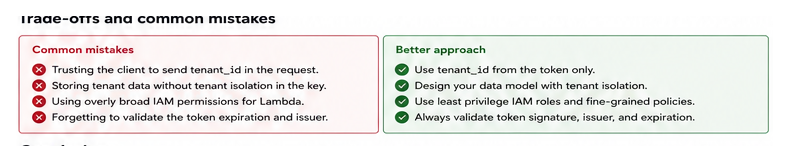
Trusting tenant IDs supplied by the client
A tenant ID in a request parameter is input, not identity. Tenant context must come from a validated authentication source.
Using Cognito groups as the complete authorization model
Groups work well for simple roles, but SaaS permissions may involve tenant-specific membership, resource ownership, or delegated access. Those rules usually belong in an application authorization model.
Securing the API but not the data model
Design DynamoDB keys, SQL predicates, or repository methods around tenant context so isolation is enforced consistently.
Putting too much information in tokens
JWT claims are convenient, but tokens remain valid for a period of time. A role change may therefore not be reflected until a new token is issued. Frequently changing authorization state may need to be checked against application data instead.
Conclusion
Cognito can solve the identity portion of multi-tenant authentication, but tenant isolation remains an application architecture responsibility. Treat the tenant identifier as trusted security context, validate it at the API boundary, and carry it into every data-access decision.
As a next step, trace one API operation from Cognito token to database query and verify that no client-controlled tenant identifier can change the resources it accesses.