
How to Reconstruct an Existing Application’s Architecture
Software architecture is often less documented than teams assume. Repositories, cloud accounts, deployment pipelines, and operational knowledge may each reveal part of the system, but none provides the complete picture.
Architecture reconstruction is the process of combining those sources into a verified model of how an application is built, deployed, secured, and operated. The objective is not to create a perfect diagram. It is to establish enough shared understanding to support maintenance, modernization, incident response, security reviews, and technical planning.
Start with Evidence, Not Assumptions
An existing application usually has at least three different architectures:
- Intended architecture: What the original design proposed.
- Implemented architecture: What the source code and infrastructure define.
- Runtime architecture: What is currently deployed and processing traffic.
These versions may differ.
A repository might contain an unused service. A cloud account may include resources left over from a previous deployment. An architecture diagram may omit a queue introduced during an incident.
For this reason, every architectural conclusion should be connected to evidence.
Useful evidence includes:
- Application and infrastructure repositories
- Cloud resource inventories
- Deployment pipelines
- Runtime configuration
- API specifications
- Database schemas
- Logs, metrics, and distributed traces
- Identity and access policies
- Interviews with developers and operators
Treat existing diagrams as inputs rather than authoritative records.
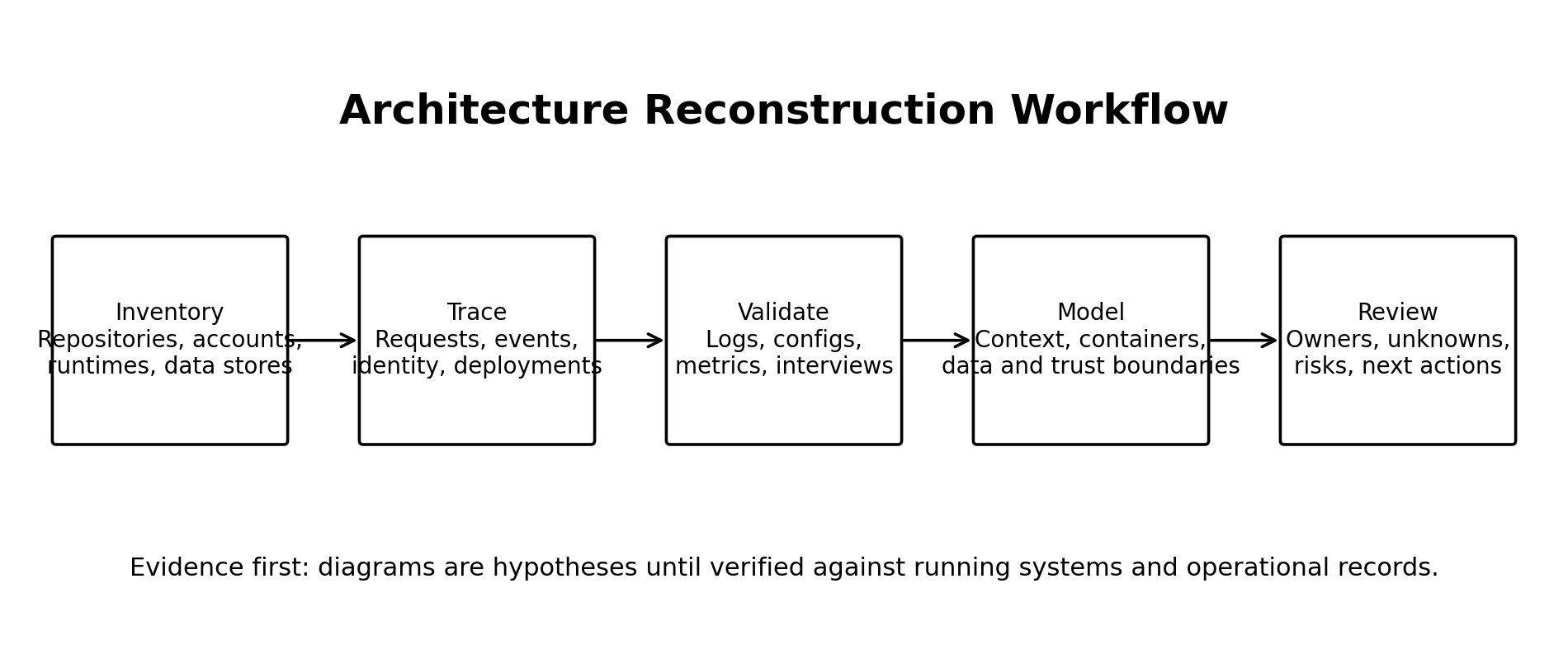
A Practical Reconstruction Workflow
1. Define the Reconstruction Boundary
Decide what you are trying to understand.
For a focused assessment, the boundary might be one customer-facing workflow. For a modernization initiative, it may include every service, data store, integration, deployment pipeline, and AWS account.
Document:
- Business capabilities in scope
- Environments in scope
- AWS accounts and regions
- Repositories
- External systems
- Known exclusions
Without a boundary, architecture discovery can become an open-ended inventory exercise.
2. Build a System Inventory
Create a simple table listing each known component and its role.
| Component | Type | Responsibility | Owner | Evidence | Status |
|---|---|---|---|---|---|
| Customer API | Lambda service | Handles booking requests | Platform team | CDK and logs | Verified |
| Notification queue | Amazon SQS | Buffers outbound messages | Unknown | AWS inventory | Partially verified |
Include application services, databases, queues, object storage, scheduled jobs, third-party APIs, identity providers, and deployment tooling.
Do not document every AWS resource at the same level. A route table may matter during a network investigation, but it usually does not belong in an application-level architecture diagram.
3. Trace Critical Workflows
Select a small number of business-critical operations and follow them from beginning to end.
Examples include:
- User authentication
- Order submission
- Payment processing
- File upload
- Report generation
- Customer notification
For each workflow, identify:
- The entry point
- Authentication and authorization checks
- Synchronous service calls
- Events and queues
- Data reads and writes
- External integrations
- Failure and retry paths
- Logs and metrics
Tracing workflows reveals dependencies that resource inventories frequently miss.
4. Reconcile Code, Infrastructure, and Runtime
Compare what the application declares with what actually exists.
For an AWS application, this may involve reviewing:
- AWS Cloud Development Kit or Terraform definitions
- API Gateway routes
- Lambda environment variables
- EventBridge rules
- SQS subscriptions and dead-letter queues
- Database connections
- IAM roles and policies
- CloudWatch logs and alarms
- CI/CD deployment stages
When sources disagree, record the discrepancy rather than choosing the most convenient answer.
For example:
The repository defines an EventBridge consumer, but no matching rule exists in production. Confirm whether the consumer is obsolete or the deployment is incomplete.
Unknowns are valid reconstruction results. Hiding them makes the final model less reliable.
5. Produce Diagrams at Several Levels
One large diagram rarely works.
Create separate views for:
- System context: Users, the application, and external systems
- Service view: Deployable applications and major data stores
- Critical workflow: Request, event, and data movement
- Deployment view: AWS accounts, regions, networks, and runtime services
- Trust boundaries: Points where identity, permissions, or data sensitivity changes
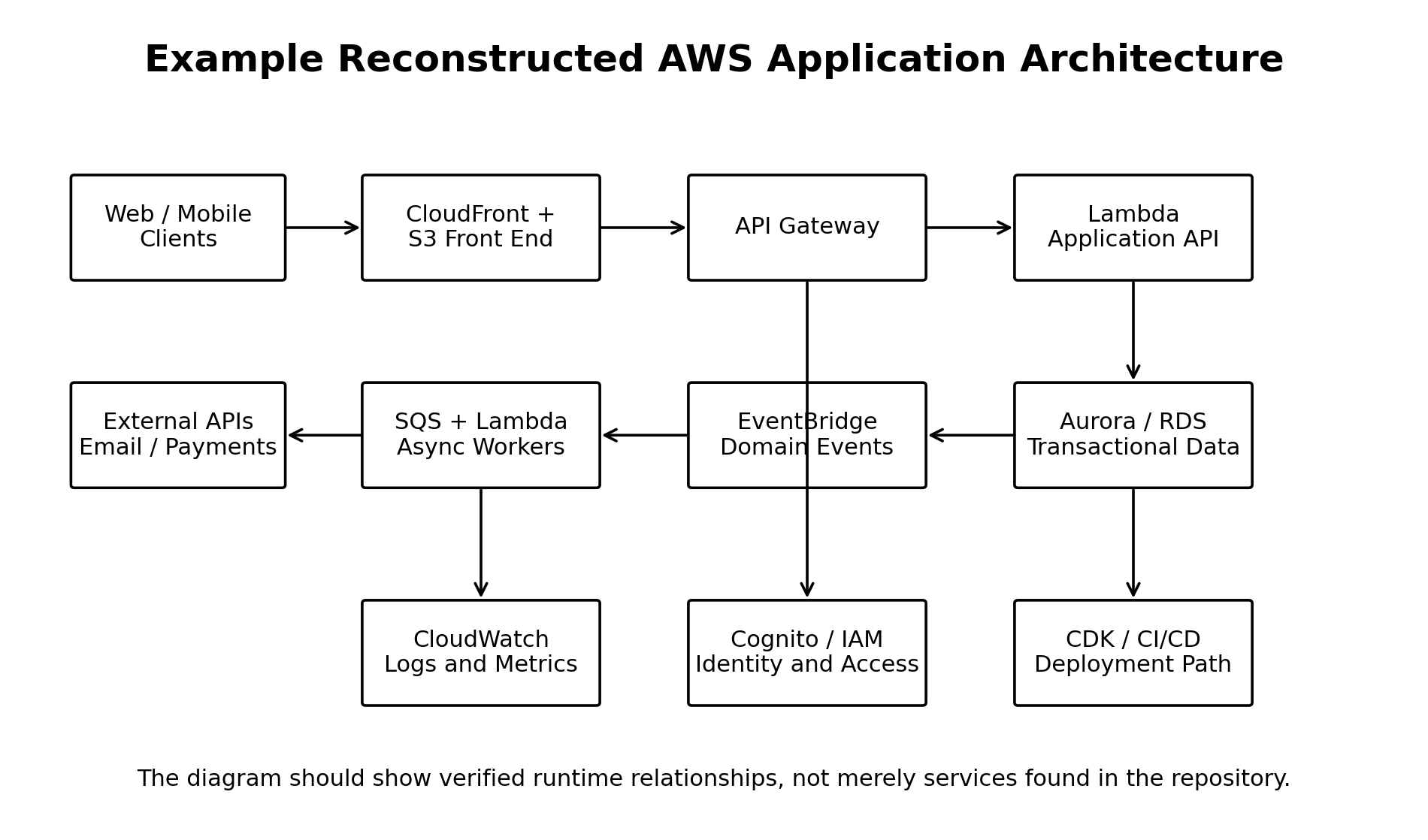
Each connection should represent a verified or explicitly marked runtime relationship. Avoid drawing lines simply because two services appear related.
Example: Reconstructing a Booking Platform
Consider a serverless booking application with a React front end and an AWS backend.
Repository inspection shows an Amazon S3 front end, Amazon API Gateway, several Lambda functions, and an Aurora database. The AWS account also contains EventBridge, SQS, and notification workers that are not shown in the original diagram.
Tracing a booking request reveals the actual workflow:
- The browser loads the application through CloudFront.
- API Gateway validates the request and invokes the booking Lambda function.
- The Lambda function writes the appointment to Aurora.
- The service publishes a
BookingCreatedevent to EventBridge. - An EventBridge rule sends the event to an SQS queue.
- A notification Lambda function reads the message and calls an external messaging provider.
- Failed notifications move to a dead-letter queue.
The reconstructed architecture now explains both the customer-facing request and the asynchronous notification path.
It also exposes an operational question: who monitors and reprocesses the dead-letter queue?
That question may be more valuable than the diagram itself.
Trade-offs and Common Mistakes
Architecture reconstruction is a sampling exercise. Logs and traces show observed behavior, not every possible execution path. Low-volume workflows, scheduled jobs, disaster-recovery components, and dormant integrations may require separate investigation.
A common mistake is generating diagrams automatically from an AWS account and treating the output as architecture documentation. Automated discovery is useful for inventory, but it cannot reliably explain business responsibilities, component ownership, workflow importance, or whether a resource is obsolete.
Another mistake is documenting only the successful path. Retry policies, timeouts, dead-letter queues, manual recovery procedures, and partial failures are part of the architecture.
Finally, avoid polishing diagrams before validating them. A visually impressive but inaccurate model creates false confidence.
Conclusion
Reconstruct architecture by moving from evidence to workflows, and from workflows to verified diagrams. Record uncertainty explicitly and separate deployed reality from intended design.
Start with one critical business workflow and trace it through the repositories, AWS environment, data stores, integrations, and operational logs before attempting to map the entire system.