
Designing Environment Separation in AWS
Development, staging, and production should not differ only because their resources contain -dev or -prod in the name. Environment separation is primarily about limiting blast radius, controlling access, and making it difficult for non-production activity to affect production.
A practical AWS design uses accounts as the main isolation boundary, then adds consistent infrastructure, identity, networking, and deployment controls around them.
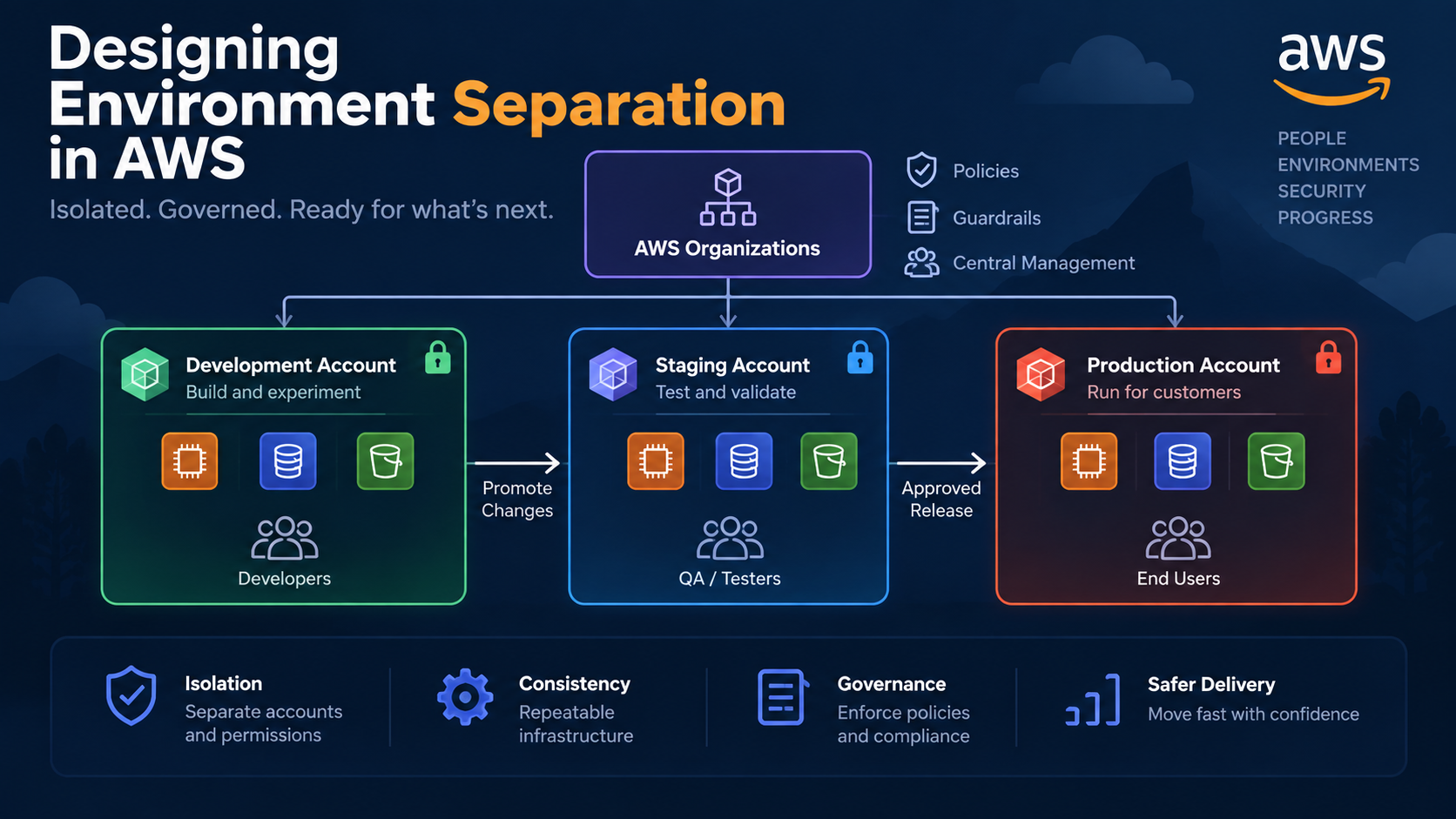
Start With Accounts, Not Just VPCs
A common early-stage architecture puts everything into one AWS account:
AWS Account
├── dev-vpc
├── staging-vpc
└── prod-vpc
This is simple, but the account remains a shared administrative and security boundary.
An overly broad IAM permission, incorrect infrastructure deployment, service quota issue, or operator mistake can potentially cross environment boundaries.
A stronger model is:
AWS Organization
├── Security
│   ├── Log Archive
│   └── Audit
│
├── Non-Production
│   ├── Development Account
│   └── Staging Account
│
└── Production
    └── Production Account
AWS recommends account-level separation as a strong isolation boundary for workloads and environments. Production and non-production workloads should normally be separated rather than placed together in a single account.
The account boundary also makes access policies, billing attribution, service quotas, and incident containment easier to reason about.
A Practical Environment Separation Pattern
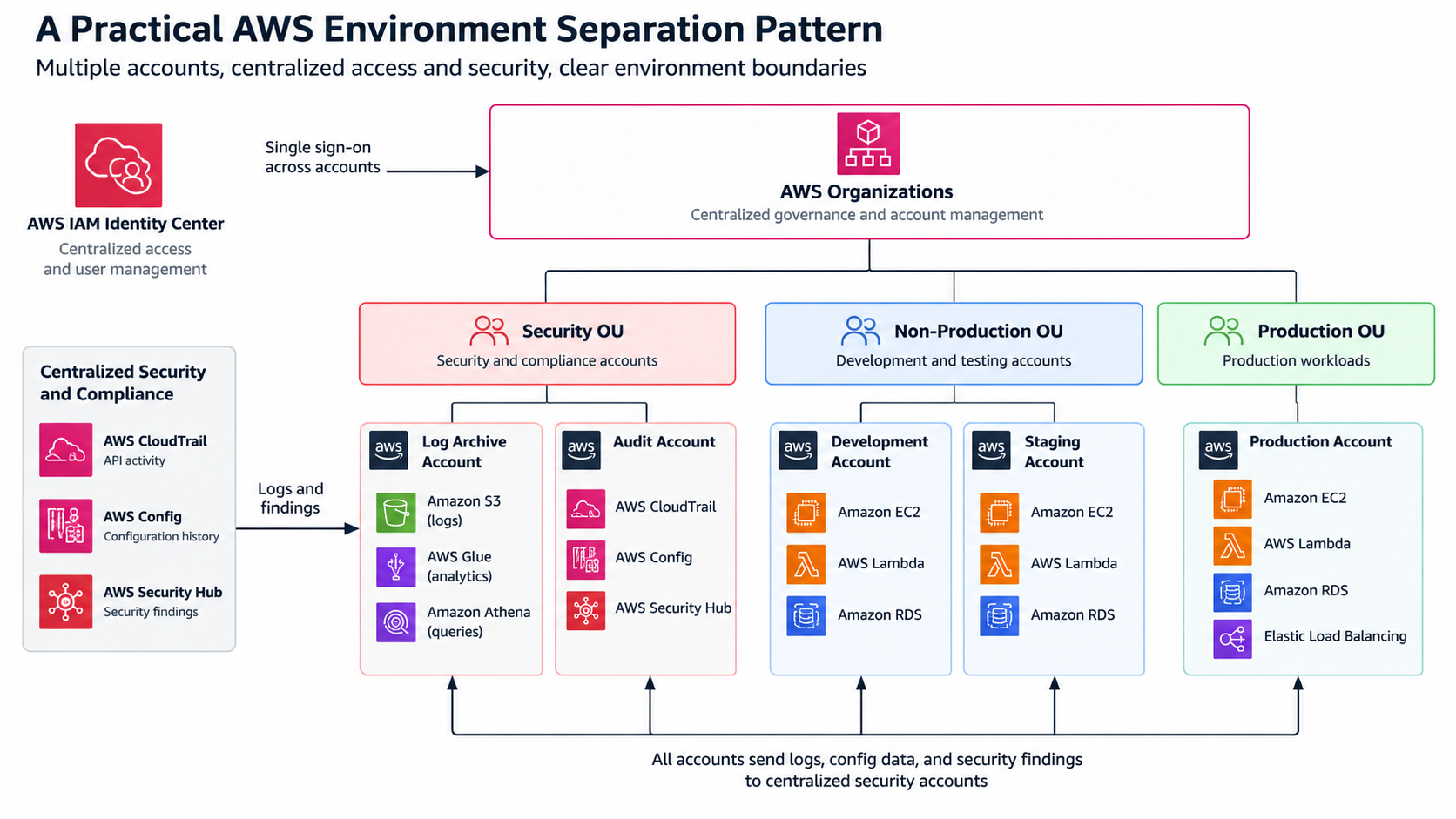
For many teams, the following approach is enough without creating dozens of accounts.
1. Put accounts under AWS Organizations
Use AWS Organizations to manage the accounts centrally.
Group them into Organizational Units, or OUs, according to the controls they require. An OU is a logical group of AWS accounts to which organizational policies can be applied.
A useful starting point is:
Security OU
NonProduction OU
Production OU
AWS Control Tower can provide a managed landing-zone model on top of AWS Organizations, including standardized account provisioning and governance controls.
2. Centralize human access
Avoid creating separate long-lived IAM users inside every environment.
Instead, use centralized federation, commonly through AWS IAM Identity Center, and assign permission sets according to environment.
For example:
| Role | Development | Staging | Production |
|---|---|---|---|
| Developer | Admin-like | Read/write | Read-only |
| QA | Read | Read/write | Read-only |
| Platform engineer | Admin | Admin | Controlled admin |
| CI/CD | Deploy | Deploy | Deploy through pipeline |
Production access should be deliberately harder than development access.
That friction is useful.
3. Deploy the same infrastructure definition
Environment separation should not mean maintaining three unrelated architectures.
Define infrastructure with AWS CDK, CloudFormation, Terraform, or another Infrastructure as Code tool and parameterize the differences:
ApplicationStack
   ↓
dev configuration
staging configuration
prod configuration
Keep architectural differences intentional.
Instance sizes, scaling limits, retention periods, or database capacity may differ. Core topology should normally remain comparable enough that staging provides meaningful validation.
4. Separate data completely
Do not let development applications casually connect to production databases.
Each environment should have its own:
- databases;
- S3 buckets;
- queues and topics;
- secrets;
- encryption configuration;
- application credentials.
If production data must be copied into a lower environment, define an explicit sanitization process rather than treating database cloning as routine.
5. Promote artifacts instead of rebuilding them
A useful delivery flow is:
Commit
  ↓
Build
  ↓
Test
  ↓
Deploy Dev
  ↓
Deploy Staging
  ↓
Approval
  ↓
Deploy Production
Ideally, the application artifact validated in staging is the artifact promoted to production.
Avoid building a new production binary from the same source after staging validation. That introduces another variable between what was tested and what was released.
Example: A Serverless SaaS Application
Consider a SaaS platform using API Gateway, Lambda, DynamoDB, SQS, and S3.
Instead of creating resources such as:
orders-dev
orders-staging
orders-prod
inside one AWS account, create three workload accounts.
The development team can experiment freely in the development account. Staging receives controlled deployments using production-like infrastructure. Production permits application changes primarily through CI/CD.
Centralized logging and security accounts can receive audit and security information from all environments. AWS specifically recommends centralized logging across accounts, and AWS Control Tower provides dedicated log archive and audit account patterns for this purpose.
A defective deployment in development is therefore much less likely to affect production resources.
Trade-Offs and Common Mistakes
Multi-account architecture adds operational work.
You need cross-account deployment roles, centralized authentication, account provisioning, logging, DNS decisions, networking, and cost management.
That does not mean every developer needs an individual AWS account.
The objective is meaningful isolation, not maximum account count.
Another mistake is allowing permanent connectivity everywhere:
Dev ↔ Staging ↔ ProductionOnce every VPC can reach every other VPC and engineers have equivalent permissions everywhere, much of the isolation benefit disappears.
Finally, do not make staging fundamentally different from production. A staging environment that uses different deployment mechanisms, networking patterns, authentication, or persistence technologies provides limited evidence that a production release will behave correctly.
A Simple Decision Framework
For each environment, ask:
- Could a mistake here affect production?
- Does this environment need different access permissions?
- Should its service quotas and costs be isolated?
- Does it contain data with different security requirements?
- Should deployments require different controls?
If several answers are yes, the environment probably belongs in a separate AWS account.
Conclusion
For most serious AWS workloads, environment separation should begin with account boundaries, not resource naming conventions. Use AWS Organizations for governance, centralized identity for access, Infrastructure as Code for consistency, and controlled pipelines for promotion.
A useful next step is to draw your existing development-to-production path and identify every place where credentials, networking, data, or deployment permissions currently cross environment boundaries.