
Designing Cross-Account CI/CD Deployments in AWS
Separating development, staging, and production into different AWS accounts improves isolation, but it creates an immediate deployment question: how does one pipeline safely deploy into all of them?
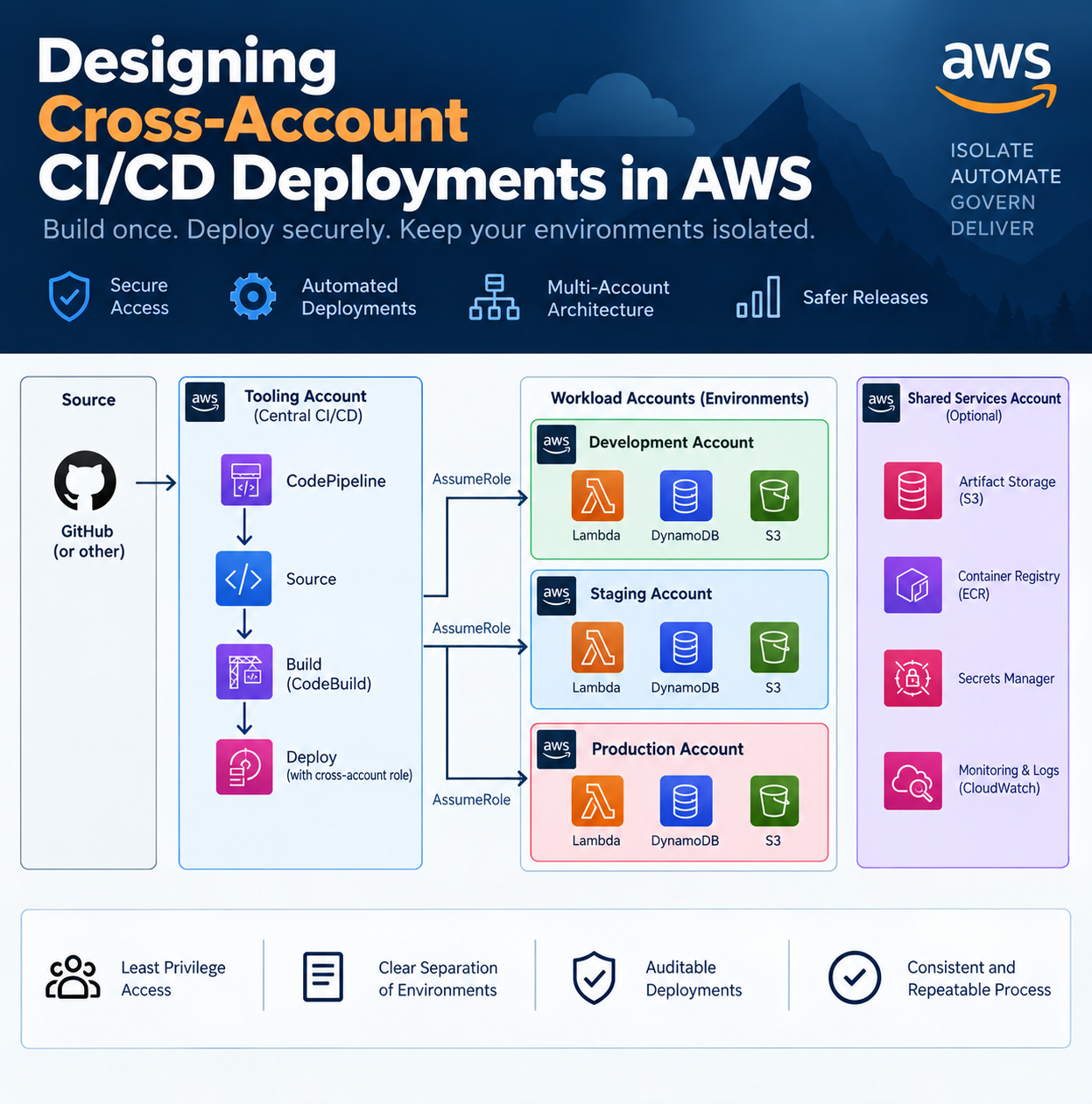
A practical answer is to centralize CI/CD in a tooling account and give the pipeline narrowly scoped roles that it can assume in each target account.
What Cross-Account CI/CD Actually Means
Consider this account structure:
AWS Organization
├── Tooling Account
├── Development Account
├── Staging Account
└── Production Account
The tooling account owns the pipeline. Development, staging, and production own the application infrastructure.
The pipeline does not receive permanent administrator credentials for every account. Instead, each workload account exposes an IAM deployment role that trusts the tooling account.
The pipeline temporarily assumes that role through AWS Security Token Service (STS) when it needs to deploy.
Conceptually:
CodePipeline / GitHub Actions
        |
        v
   Tooling Account
        |
        | AssumeRole
        v
+-------+-------+-------+
|               |       |
Dev           Staging   Production
Role           Role       Role
The distinction matters: the pipeline gets only the permissions required for that deployment and only while the role session exists.
A Practical Cross-Account Pattern
1. Keep CI/CD in a dedicated account
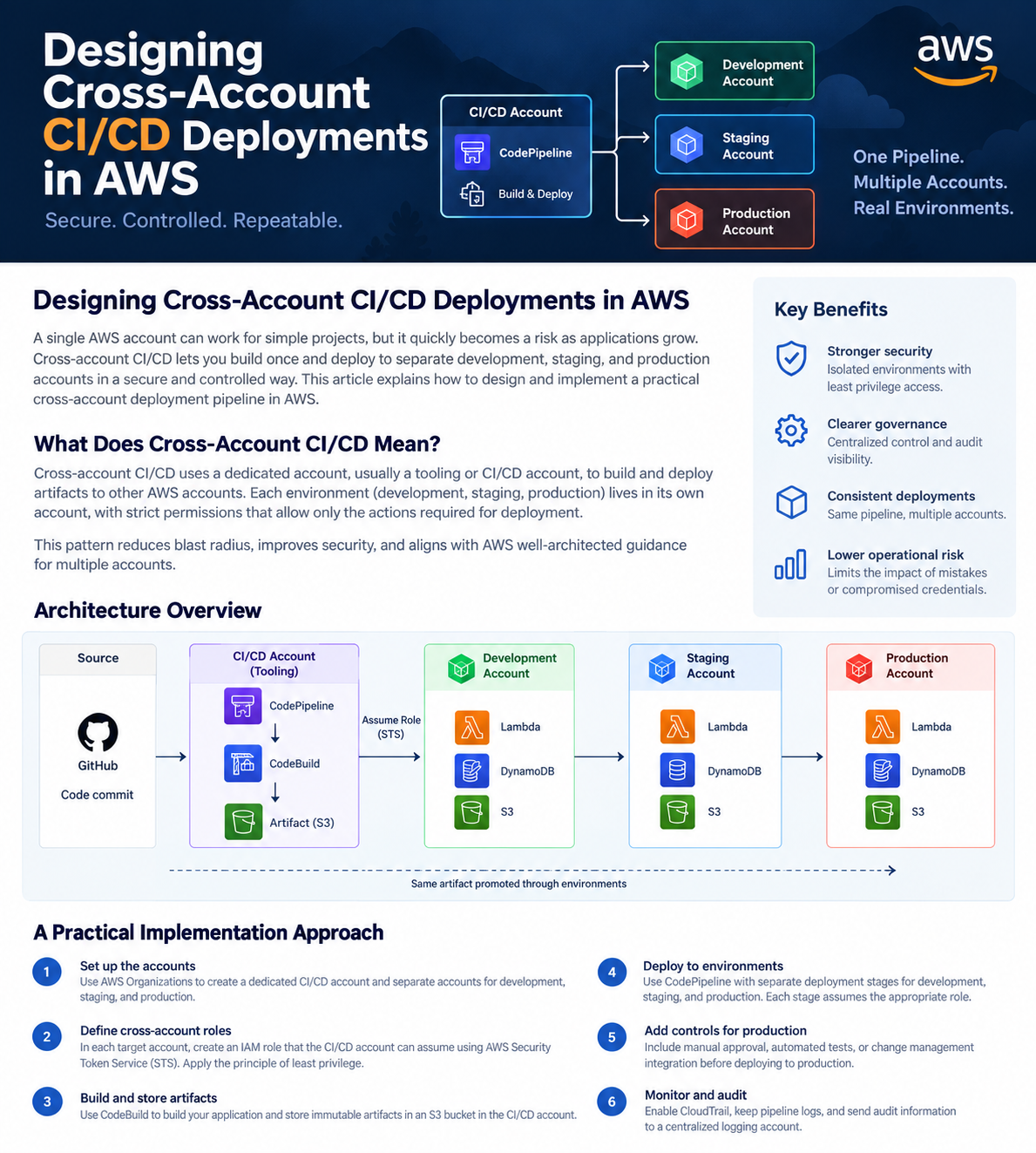
Place services such as CodePipeline, CodeBuild, or your self-hosted CI runners in a tooling account.
This separates deployment infrastructure from the applications being deployed and gives you one place to control pipeline permissions, logs, artifacts, and release policies.
The same model also works when GitHub Actions or another external CI platform initiates deployments.
2. Create a deployment role in every target account
Each environment gets its own IAM role:
DevDeploymentRole
StagingDeploymentRole
ProductionDeploymentRole
The trust policy allows the authorized pipeline identity in the tooling account to assume the role.
The permissions attached to the role determine what the pipeline can modify.
Avoid this:
AdministratorAccesswhen the application requires only CloudFormation, Lambda, API Gateway, DynamoDB, or a limited set of infrastructure operations.
Production can use a more restrictive role than development.
3. Build once
The pipeline should build the application artifact once:
Source
  ↓
Build
  ↓
Test
  ↓
Artifact
Store that immutable artifact in S3 or, for containers, Amazon ECR.
Do not rebuild the application separately for staging and production.
Otherwise, the artifact that passed staging is not necessarily the artifact deployed to production.
4. Promote the artifact through accounts
The release flow becomes:
Build
  ↓
Development
  ↓
Integration Tests
  ↓
Staging
  ↓
Acceptance Tests
  ↓
Approval
  ↓
Production
Only the environment-specific configuration should change.
For example:
DATABASE_NAME
LOG_LEVEL
DOMAIN_NAME
SCALING_LIMIT
The application binary or container image should remain unchanged.
AWS CodePipeline supports cross-account deployment actions using IAM roles. When pipeline artifacts are shared across accounts, the artifact bucket permissions and encryption configuration must also allow the target account to access them.
5. Treat production differently
Automation does not mean production must deploy automatically after every commit.
A production stage can require:
- successful staging tests;
- a manual approval;
- automated security checks;
- change-window validation;
- additional deployment policies.
CodePipeline provides approval actions that can be inserted directly into the deployment flow.
The objective is not to make production deployment slow. It is to make the transition into production explicit and observable.
Example: Serverless API Deployment
Suppose an application uses:
API Gateway
Lambda
DynamoDB
S3
AWS CDK defines the infrastructure.
The tooling account builds the Lambda package and synthesizes the CloudFormation templates.
Deployment then proceeds:
Tooling Account
     |
     +--> Assume DevDeploymentRole
     |        ↓
     |      Dev
     |
     +--> Assume StagingDeploymentRole
     |        ↓
     |     Staging
     |
     +--> Assume ProductionDeploymentRole
              ↓
          Production
With AWS CDK, target environments can be bootstrapped to trust the account containing the deployment pipeline. AWS provides bootstrap options specifically for allowing another AWS account to deploy into an environment.
The application code is built once. CDK configuration supplies environment-specific values such as account ID, Region, domain, and capacity settings.
Trade-Offs and Common Mistakes
Cross-account CI/CD introduces additional IAM, encryption, artifact-access, and bootstrapping configuration.
That complexity is justified when account boundaries matter, but it may be unnecessary for a small experimental workload with no meaningful production environment.
The most common mistake is solving cross-account access by giving the pipeline excessive permissions.
Another is building independently in every environment:
Build Dev
Build Staging
Build Production
That weakens the idea of promotion because each build can theoretically produce something different.
Artifact handling also deserves attention. CodePipeline applies specific rules to how artifacts can move between accounts, and cross-account pipelines commonly require explicit S3 bucket and AWS KMS permissions.
Finally, avoid putting application secrets directly into pipeline variables. The pipeline should deploy references to environment-specific secrets stored in services such as AWS Secrets Manager or Systems Manager Parameter Store.
A Simple Deployment Checklist
Before implementing cross-account CI/CD, verify:
- Each environment has its own AWS account.
- CI/CD runs from a controlled tooling account or trusted external identity.
- Every target account exposes a least-privilege deployment role.
- Artifacts are built once and promoted.
- Artifact storage and encryption support the required cross-account access.
- Production has stronger deployment controls than development.
- CloudTrail and pipeline logs provide an audit trail of deployments.
Conclusion
Cross-account CI/CD is mostly an identity and trust-design problem. The pipeline should build once, assume narrowly scoped roles in each environment, and promote the same artifact from development through production.
Start by drawing the trust relationships between your tooling account and workload accounts. If those relationships are unclear or rely on broad administrator access, that is the first part of the pipeline to redesign.